

Table of Contents
- What Are the 7 QC Tools?
- Understand 7QC tools with example
- How to Choose the Right QC Tool for a Quality Problem
- How the 7 QC Tools Improve Quality Control
- Common Mistakes to Avoid When Using the 7 QC Tools
- When Are the Traditional 7 QC Tools Not Enough?
- How 4C Consulting Can Help Your Organization Apply the 7 QC Tools
- Frequently Asked Questions
7 QC Tools for Quality Improvement with a Strategic Plan
2nd Nov, 2026
A recurring product defect, an unexpected increase in customer complaints, or inconsistent production output can signal a quality problem. However, finding the cause requires more than assumptions. Teams need reliable data and a structured way to analyse what is happening.
The 7 QC tools provide a practical approach to identifying defects, understanding process variation, investigating potential causes, and monitoring quality performance. These tools help organizations make informed decisions instead of relying on trial and error.
For manufacturing companies, they can support everything from analysing dimensional defects to monitoring machine performance. Service organizations can also use them to investigate complaints, delays, and process errors.
In this guide, we explain the 7 QC tools with examples, their applications, and how to choose the right tool for a specific quality problem.
What Are the 7 QC Tools?
The seven basic quality control tools are simple, structured methods used to collect data, analyse problems, understand variation, and support continuous improvement. They are commonly associated with the foundational quality methods popularized by quality expert Kaoru Ishikawa.
The traditional toolkit includes:
- Check Sheet
- Histogram
- Pareto Chart
- Cause-and-Effect Diagram
- Scatter Diagram
- Control Chart
- Stratification
Some quality references use a flowchart or run chart in place of stratification. The exact list can therefore vary depending on the framework being followed.
Each tool serves a different purpose. A check sheet helps collect information, a Pareto chart helps prioritize problems, and a cause-and-effect diagram helps teams investigate possible causes. Used together, these tools can support a more systematic approach to quality improvement.
Understand 7QC tools with example
Understanding the purpose of each tool helps teams select the right method for a specific quality problem. The following examples demonstrate how these tools can be applied in practical situations.
1. Check Sheet
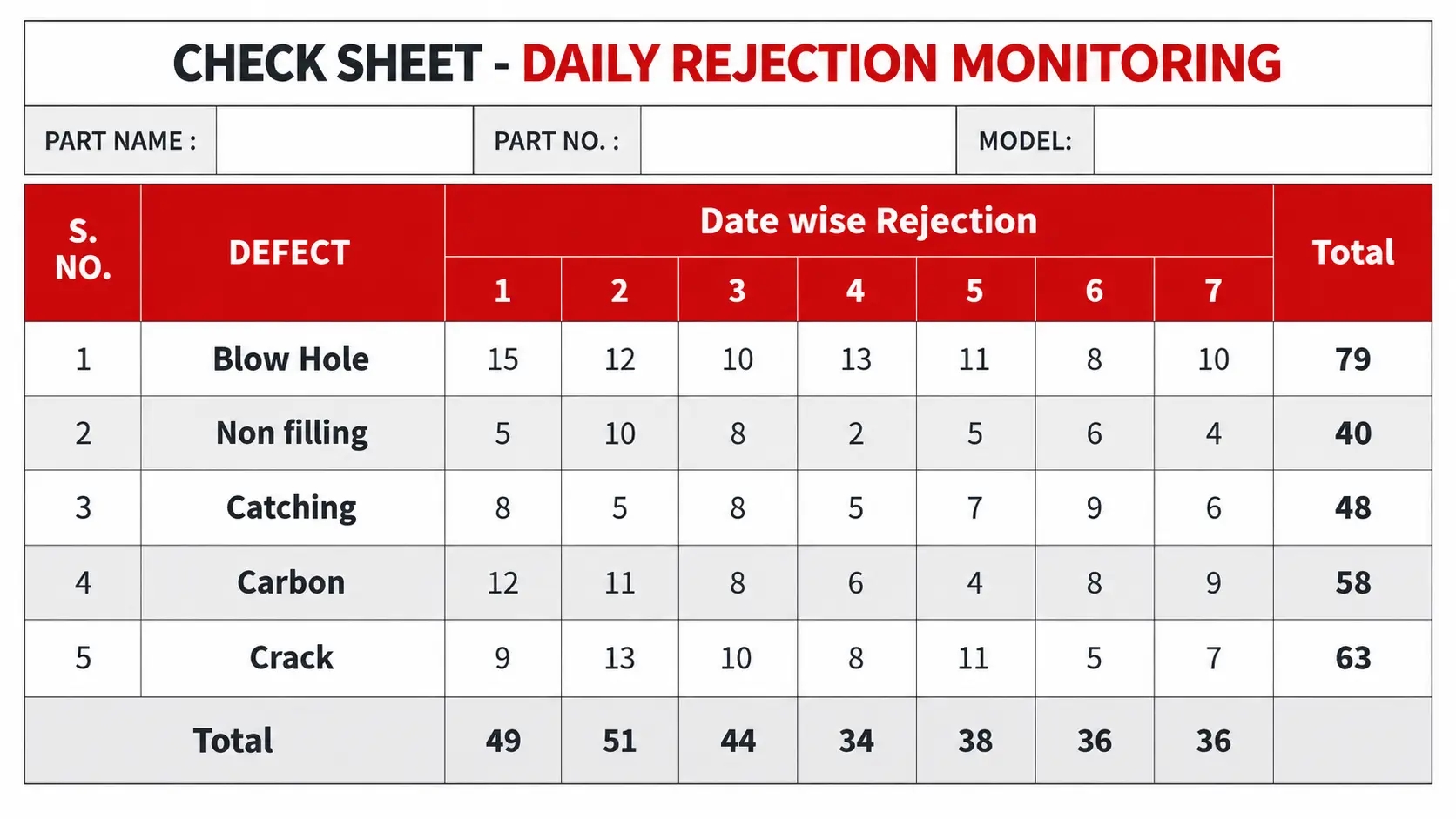
A check sheet is a structured form used to record and organize quality-related data as events occur. It helps teams track recurring defects, inspection results, equipment downtime, and other process issues consistently.
Where to use a check sheet:
- Defect tracking: Record recurring product defects during manufacturing and inspection.
- Quality inspections: Document inspection results and non-conforming products.
- Equipment monitoring: Track machine breakdowns and downtime.
- Production analysis: Compare defect frequency across machines, production lines, or shifts.
- Customer complaint tracking: Record recurring complaint categories.
- Process monitoring: Collect data before conducting further quality analysis.
Example: An automotive component manufacturer experiences an increase in rejected parts. The quality inspector prepares a check sheet with categories for surface scratches, dimensional deviations, and incomplete machining. Defects are recorded under the appropriate category during each production shift.
After several days, the quality team reviews the records to identify the most frequent defects and compare results across shifts and production lines. If dimensional deviations occur more frequently on one line, the team can investigate the relevant machine settings, tooling condition, and inspection process.
Key benefit: A check sheet establishes a consistent record of quality issues and provides data that can be used for further analysis, including Pareto charts and root cause investigations.
2. Histogram
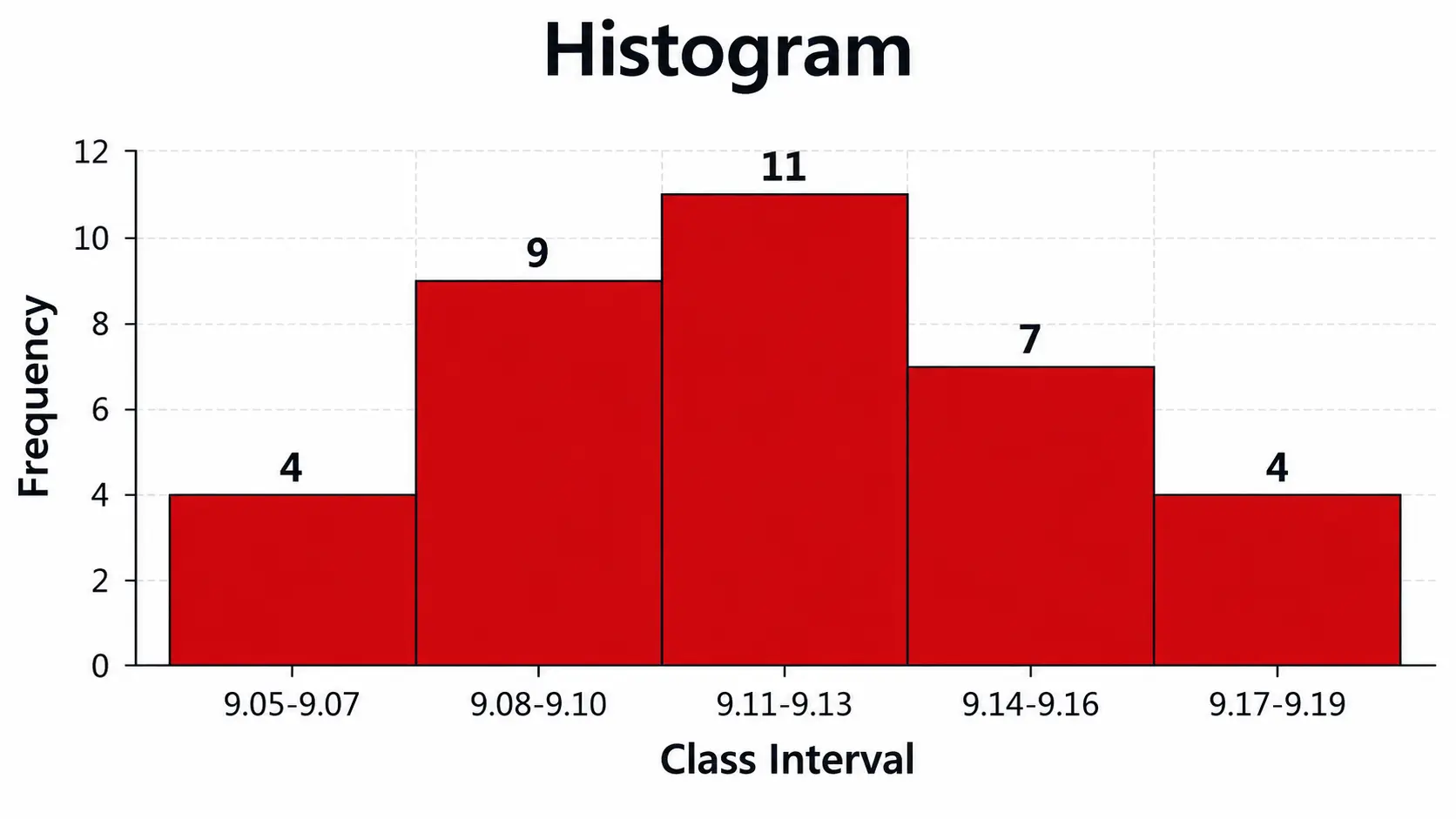
A histogram is a graphical representation of the frequency distribution of numerical data. It groups measurements into intervals and displays how frequently values fall within each interval.
In quality control, a histogram helps teams understand the spread of measurements and identify patterns that may be difficult to recognize in a spreadsheet.
Where to use a histogram:
- Dimensional quality checks: Analyse variations in component diameter, length, or thickness.
- Product weight analysis: Examine weight variations in packaged goods or manufactured products.
- Process consistency: Assess how measurements are distributed across a production process.
- Production time analysis: Examine variations in cycle times or processing durations.
- Inspection data analysis: Identify patterns in measurement results.
- Specification comparison: Review how measurements are distributed relative to product specification limits.
Example: A manufacturer measures the diameter of machined metal components to check dimensional consistency. The quality team plots the measurements in a histogram and finds that many values cluster near the lower specification limit.
This pattern prompts an investigation into machine settings, tool wear, and measurement methods to determine whether process adjustments are necessary.
Key benefit: A histogram makes measurement variation easier to interpret and helps identify patterns that warrant further investigation. Unlike a control chart, it does not show how process behaviour changes over time.
3. Pareto Chart
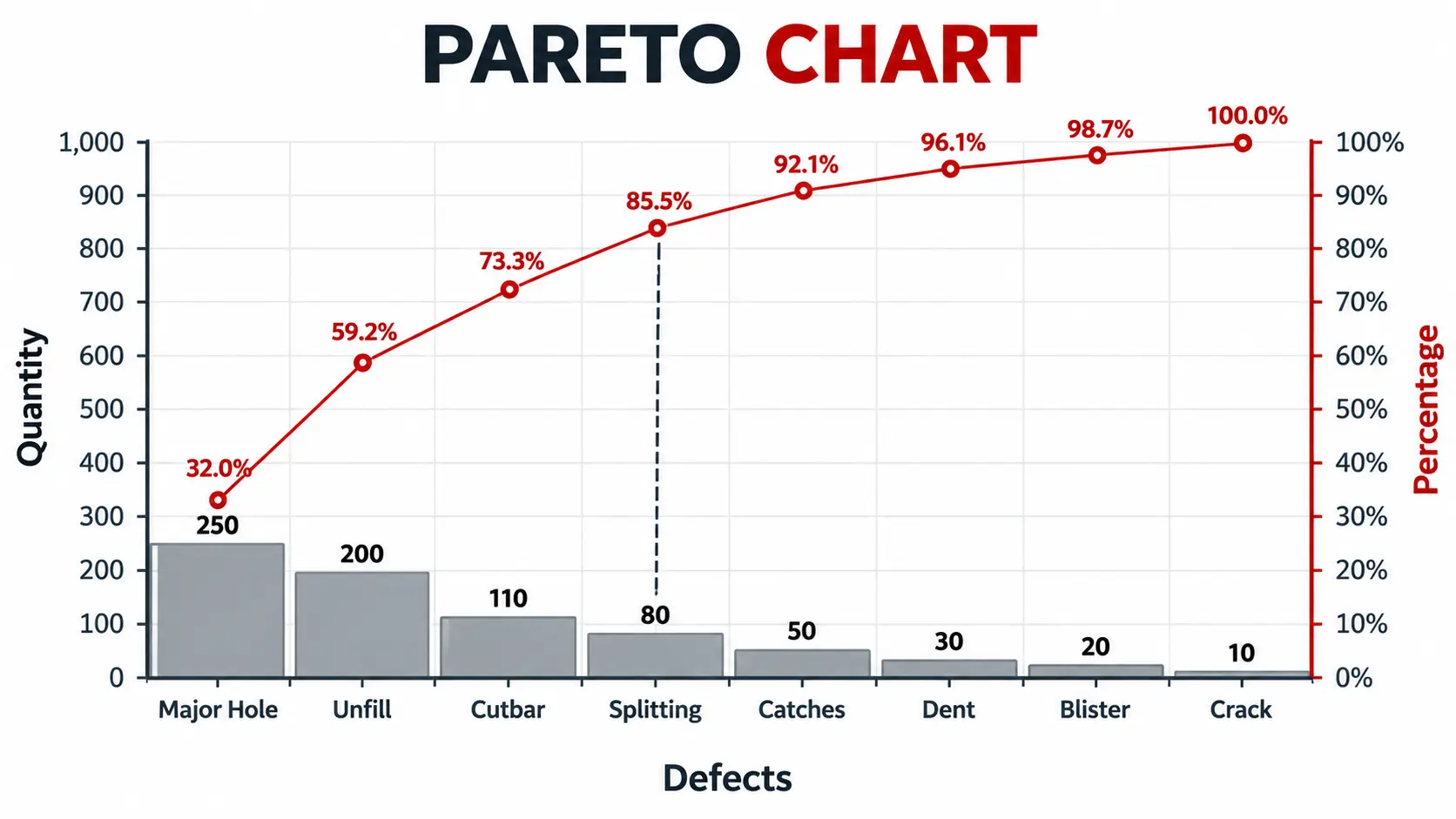
A Pareto chart ranks problem categories from highest to lowest using bars, often accompanied by a cumulative percentage line. It helps teams identify which categories account for the largest share of observed quality issues.
The chart is associated with the Pareto principle, commonly expressed as the 80/20 rule. However, actual quality data does not always follow an exact 80/20 distribution.
Where to use a Pareto chart:
- Defect prioritization: Identify the most frequently occurring product defects.
- Customer complaint analysis: Rank complaint categories by frequency or impact.
- Rejection analysis: Determine the main contributors to product rejection and rework.
- Equipment downtime: Compare machine stoppages by frequency or total downtime.
- Production improvement: Prioritize recurring problems affecting manufacturing performance.
- Corrective action planning: Identify which issues deserve attention first.
Example: A packaging manufacturer records defects involving incorrect labels, damaged packaging, sealing failures, and incorrect quantities. The quality team prepares a Pareto chart using the recorded defect counts.
The chart shows that sealing failures account for the largest share of defects. The team therefore prioritizes an investigation into sealing temperature, machine settings, and maintenance practices. After implementing corrective actions, it collects new data to assess whether sealing failures have decreased.
Key benefit: A Pareto chart helps organizations prioritize quality improvement efforts according to the observed frequency or impact of different problems, rather than treating every issue as equally important.
4. Cause-and-Effect Diagram (Fishbone Diagram)
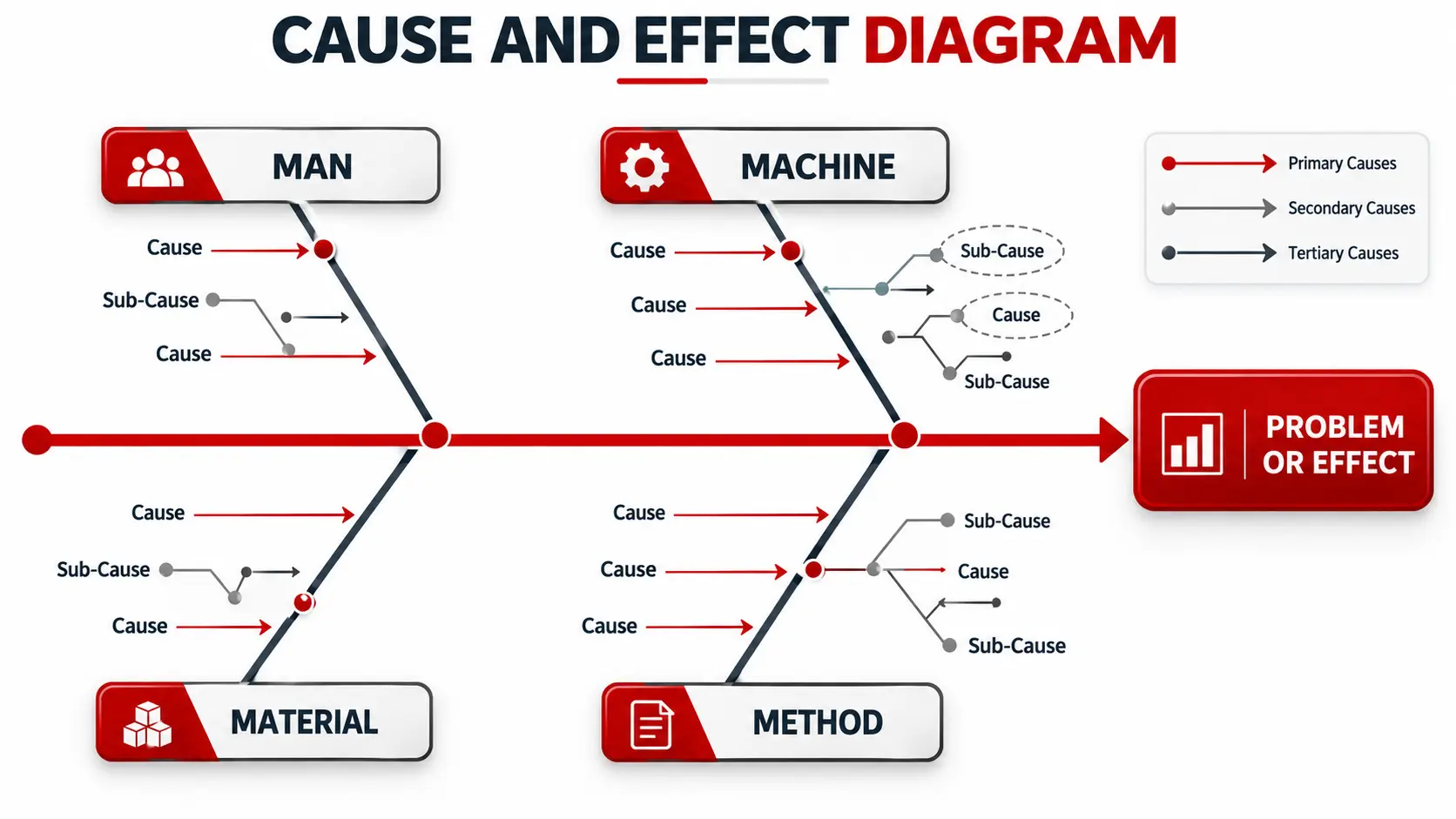
A cause-and-effect diagram, also known as a fishbone diagram or Ishikawa diagram, organizes possible causes of a specific problem into categories. The problem appears at the head of the diagram, while branches represent factors that may contribute to it.
In manufacturing, common categories include Manpower, Machine, Method, Material, Measurement, and Environment. Teams can adapt these categories to suit the issue being investigated.
Where to use a cause-and-effect diagram:
- Defect investigation: Explore potential causes of recurring product defects.
- Manufacturing problems: Investigate surface imperfections, dimensional errors, or inconsistent product quality.
- Process failures: Examine factors contributing to delays, rework, or production interruptions.
- Customer complaints: Organize possible reasons for repeated complaints.
- Quality deviations: Investigate why a process fails to meet established requirements.
- Corrective action planning: Identify potential causes that require verification.
Example: A precision manufacturing company notices recurring surface defects on finished components. The quality team creates a fishbone diagram and groups potential causes under machines, materials, methods, manpower, and measurement.
The team considers worn cutting tools and incorrect machine settings under the machine category. It also examines raw material consistency, operator practices, and inspection methods. Production records, maintenance logs, and inspection data are then reviewed to determine which possibilities are supported by evidence.
Key benefit: A cause-and-effect diagram gives teams a structured way to investigate a problem and avoid overlooking potential causes. The diagram does not confirm the root cause; further investigation is required to validate it.
5. Scatter Diagram
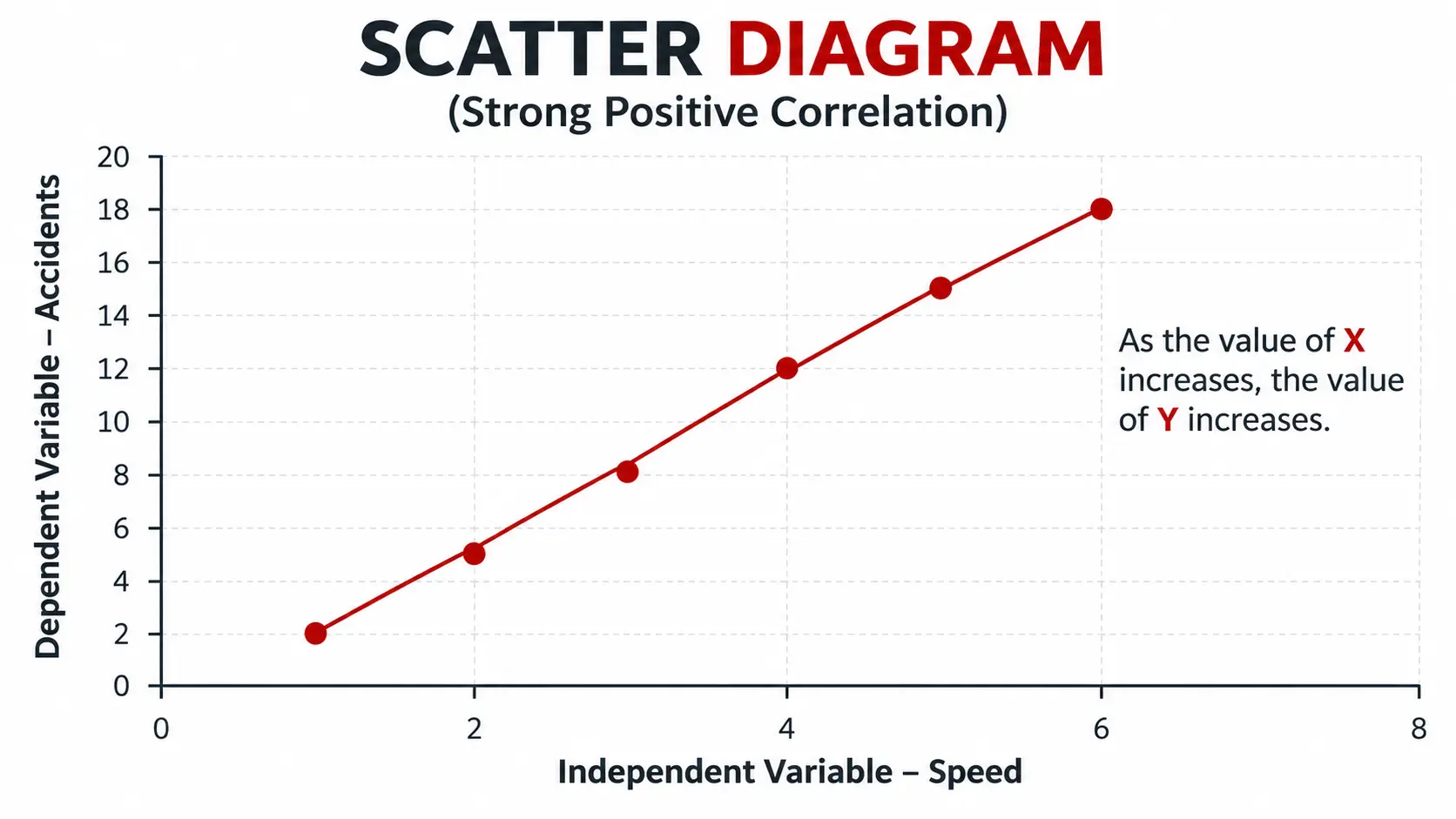
A scatter diagram, also called a scatter plot, displays paired numerical measurements on two axes to examine whether a relationship may exist between two variables.
The pattern of points can indicate a positive relationship, a negative relationship, or no clear relationship. This helps teams investigate whether measurable process factors may be associated with changes in quality outcomes.
Where to use a scatter diagram:
- Process parameter analysis: Examine relationships between temperature, pressure, machine speed, and quality results.
- Dimensional quality control: Investigate possible links between machine settings and component measurements.
- Defect analysis: Explore associations between operating conditions and defect rates.
- Material quality assessment: Examine relationships between raw material properties and finished product performance.
- Production performance: Investigate possible links between processing time and defect rates.
- Quality investigations: Identify relationships that may require further testing.
Example: A precision manufacturer suspects that machining temperature may be associated with dimensional deviations. The quality team records temperature readings alongside the corresponding measurements of finished components and plots the paired values.
If the points show a consistent pattern, the team investigates the relationship further by reviewing machine conditions, tooling, and measurement methods. Additional testing may be needed to establish whether temperature contributes to the observed variation.
Key benefit: A scatter diagram helps teams investigate relationships using actual measurements rather than assumptions. A correlation alone does not establish that one variable cause another.
6. Control Chart
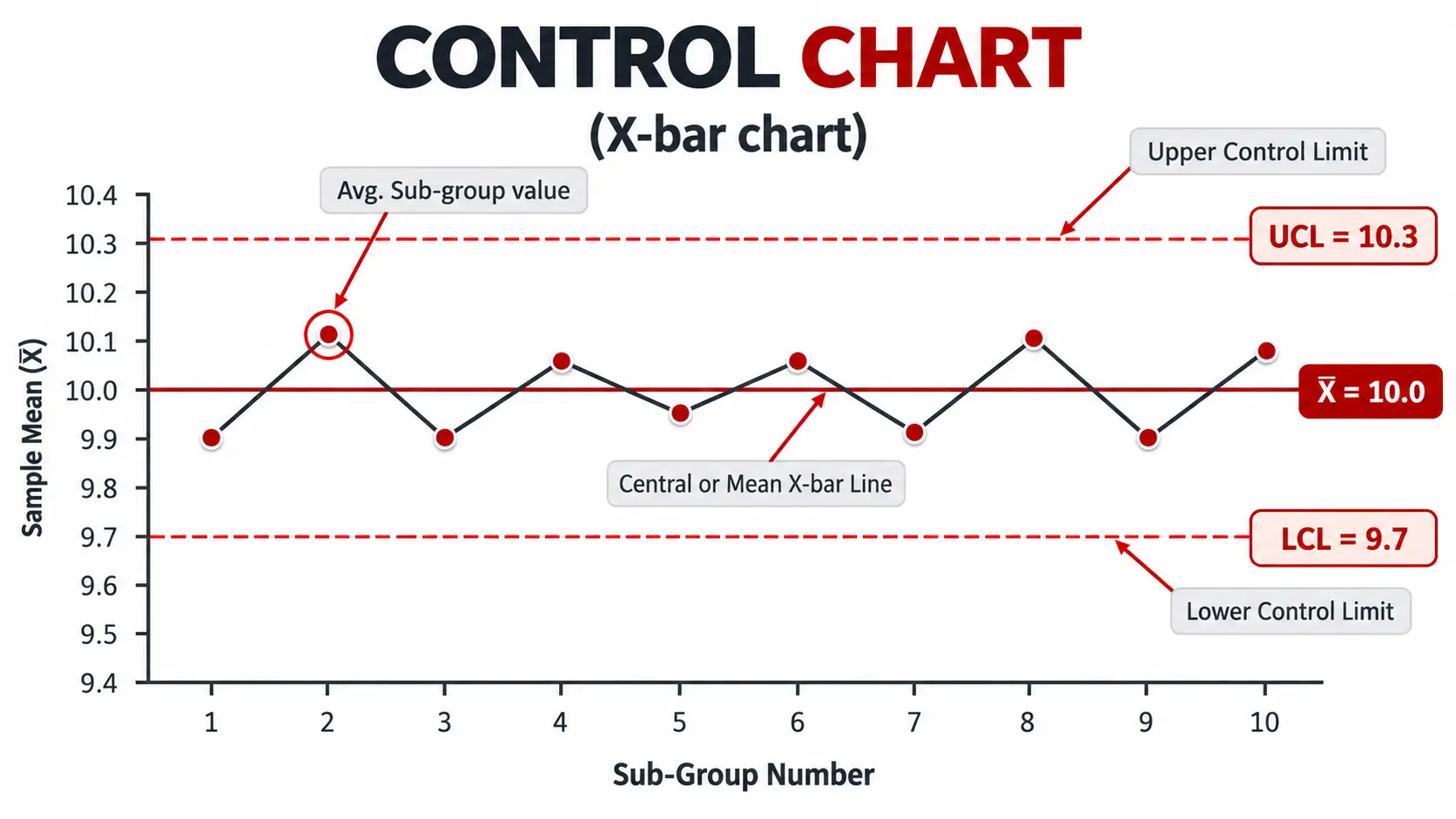
A control chart tracks process measurements over time against a centre line and statistically calculated upper and lower control limits. It helps teams identify unusual changes in process behaviour that may require investigation.
Control charts are useful for ongoing monitoring because they show the sequence of measurements rather than presenting all observations as a single distribution.
Where to use a control chart:
- Manufacturing process monitoring: Track component diameter, thickness, or length over time.
- Defect rate monitoring: Observe changes in the number or proportion of defective products.
- Machine performance: Identify unusual changes in process output.
- Production consistency: Assess whether a process remains statistically stable.
- Service quality monitoring: Track processing times, error rates, or service delays.
- Improvement verification: Monitor process behaviour after corrective actions or process changes.
Example: A precision component manufacturer measures the diameter of machined parts at regular intervals during production. The quality team plots the readings on an appropriate control chart and compares them with the calculated control limits.
When a point falls outside these limits, the team investigates potential factors such as tool wear, machine adjustments, raw material variation, or measurement errors. It then determines whether corrective action is necessary.
It is important to distinguish control limits from specification limits. Control limits help assess process behaviour, while specification limits define the acceptable requirements for a product or process.
Key benefit: Control charts help organizations detect unusual process variation and assess stability over time, supporting timely investigation when performance changes.
7. Stratification
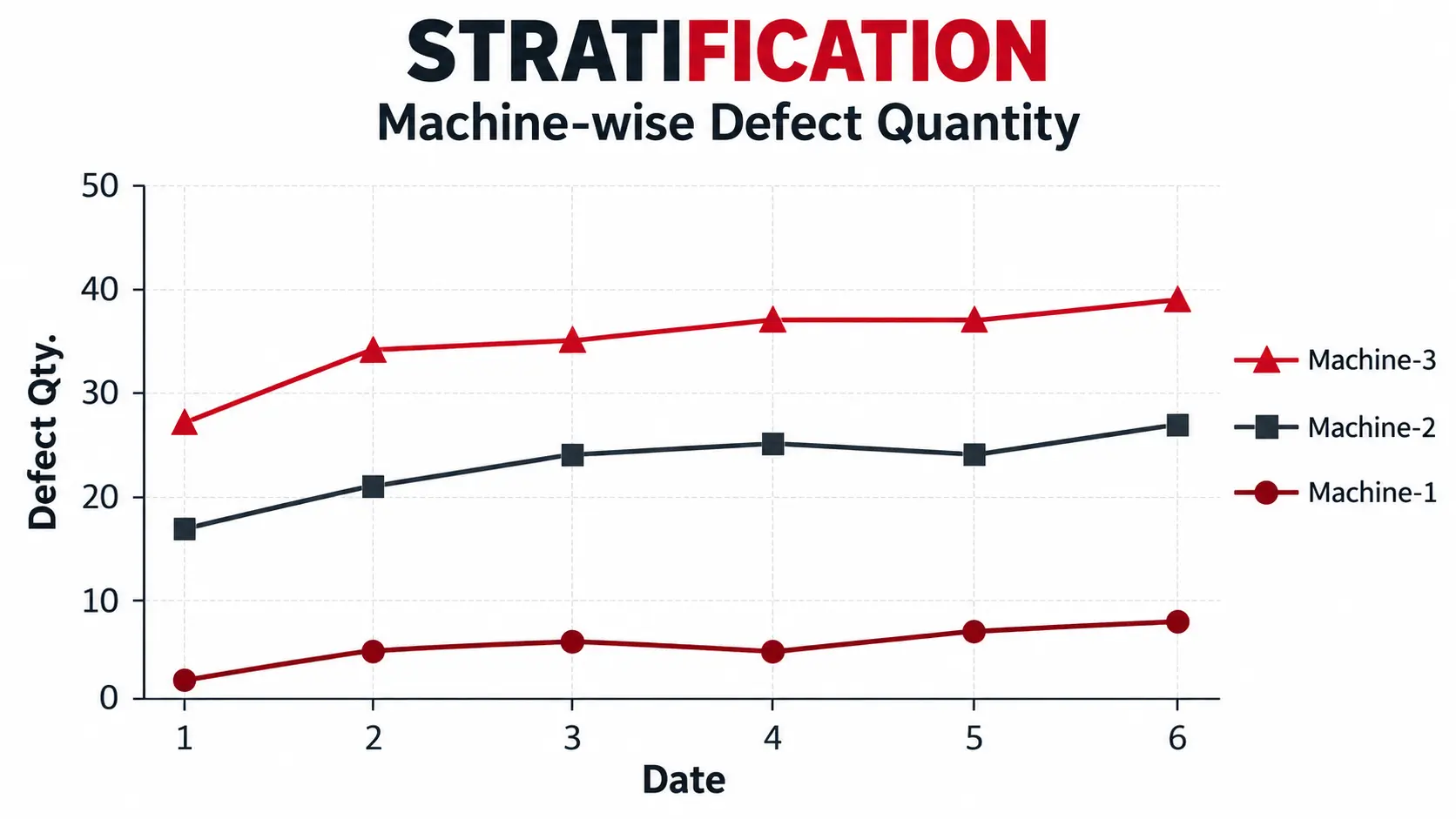
Stratification involves separating data into meaningful groups to identify patterns that may remain hidden when all information is analysed together. Teams can group data by machine, production shift, supplier, product type, production line, or location.
This technique helps reveal whether a quality problem is concentrated in a particular category rather than affecting the entire operation equally.
Where to use stratification:
- Defect analysis: Compare defect rates across machines, production lines, or product categories.
- Shift-wise quality monitoring: Identify differences in quality performance between shifts.
- Supplier performance evaluation: Compare material defects or non-conformities across suppliers.
- Product quality assessment: Examine variations between product models or batches.
- Process performance analysis: Compare results across operating conditions or manufacturing locations.
- Root cause investigation: Narrow down the areas requiring further investigation.
Example: A manufacturer notices an increase in rejected components but cannot identify the source from the overall rejection figures. The quality team separates the data by machine and production shift.
The comparison reveals that one machine has a noticeably higher rejection rate. The team then reviews its calibration records, maintenance history, operating conditions, and inspection results to investigate the difference.
Key benefit: Stratification makes group-specific differences easier to identify, helping teams focus their quality investigations on the area’s most likely to require attention.
How to Choose the Right QC Tool for a Quality Problem
Selecting the right quality control tool depends on the problem you need to investigate and the type of data available. Each of the seven QC tools serves a different purpose, from recording defects and analysing process variation to identifying possible causes and monitoring performance over time.
The following table helps you select a suitable tool based on your quality improvement objective.
| Quality problem | Suitable QC tool | Purpose |
|---|---|---|
| Recording recurring defects | Check Sheet | Collect and organize consistent data |
| Understanding the spread of measurements | Histogram | Visualize data distribution and variation |
| Prioritizing defect categories | Pareto Chart | Identify the largest contributors to a problem |
| Exploring possible causes | Cause-and-Effect Diagram | Organize potential causes for investigation |
| Examining relationships between variables | Scatter Diagram | Identify possible associations between variables |
| Monitoring process behaviour over time | Control Chart | Detect unusual variation and assess process stability |
| Comparing results across machines or shifts | Stratification | Identify group-specific patterns in quality data |
For example, if a manufacturer experiences an increase in rejected components, the quality team can begin by using a check sheet to record defects consistently. A Pareto chart can then help prioritize the most frequent defect categories, while a cause-and-effect diagram can organize potential reasons for the problem. Stratification can help determine whether rejection rates differ across machines, shifts, or production lines.
After investigating and verifying the likely causes, the team can implement corrective actions and use a suitable control chart to monitor subsequent process performance.
The key is to use each QC tool for the question it is designed to answer. Not every quality problem requires all seven tools. Selecting the right combination based on the available data and investigation stage helps teams make better decisions and improve process quality more systematically.
How the 7 QC Tools Improve Quality Control
When applied correctly, the 7 QC tools help organizations turn quality observations into structured analysis. Their value comes from using appropriate data to support decisions and verify whether changes are effective.
- Better identification of recurring defects: Check sheets and Pareto charts help teams record problems consistently and identify which defect categories deserve attention first.
- More structured problem investigation: Cause-and-effect diagrams help organize possible explanations, while scatter diagrams and stratification help teams investigate patterns in the data.
- Improved process monitoring: Histograms and control charts provide different views of process performance. Histograms show the distribution of measurements, while control charts track process behaviour over time.
- More informed corrective action: Instead of reacting to isolated incidents, teams can use quality data to investigate problems, select appropriate actions, and check whether the changes have produced the intended result.
- Support for continuous improvement: The tools can support recurring quality reviews and improvement activities. When used consistently, they help teams build a clearer understanding of process performance and identify areas that need attention.
Common Mistakes to Avoid When Using the 7 QC Tools
Even simple quality tools can produce misleading conclusions if teams use them incorrectly. Keep the following points in mind:
- Collecting incomplete data: Missing measurements or inconsistent defect categories can distort the analysis.
- Choosing the wrong tool: A histogram cannot establish process stability over time, and a Pareto chart does not identify the root cause on its own.
- Assuming correlation proves causation: A relationship shown in a scatter diagram needs further investigation before conclusions are drawn.
- Confusing control limits with specification limits: These serve different purposes and should not be treated as interchangeable.
- Taking action without verifying the cause: A possible cause identified during brainstorming must be checked against evidence.
- Failing to monitor results: After implementing a change, teams should review subsequent data to assess whether the improvement is sustained.
A disciplined approach to data collection, analysis, corrective action, and follow-up makes these tools more useful in day-to-day quality management.
When Are the Traditional 7 QC Tools Not Enough?
The traditional seven QC tools are useful for analysing quality problems, understanding process variation, and monitoring performance. However, they do not cover every planning or management challenge.
For example, a team may need to map complex relationships between issues, break a broad objective into manageable tasks, prioritize several competing actions, or anticipate risks during project implementation. These situations may require additional management and planning tools.
The new 7 QC tools, also known as the seven management and planning tools, address a different set of needs. They support activities such as organizing ideas, mapping relationships, structuring plans, prioritizing options, and anticipating potential implementation problems.
To understand how the two groups differ and when each is useful, read our guide to New 7 QC Tools vs Old 7 QC Tools: Planning and Quality Management Tools.
How 4C Consulting Can Help Your Organization Apply the 7 QC Tools
4C Consulting helps organizations apply the 7 QC tools to identify defects, investigate root causes, monitor process performance, and improve quality management practices. Our expert guidance and practical training help teams use tools such as Pareto charts, fishbone diagrams, and control charts to make data-driven decisions and support continuous improvement.
Want to strengthen your quality improvement process?
Chat with a 4C Consulting Lean Consultant on WhatsApp
Frequently Asked Questions
1. How do you implement the 7 QC tools in a manufacturing company?
Start by defining a specific quality problem, such as rising rejection rates or recurring customer complaints. Collect reliable data using a check sheet, analyse the results with suitable tools, investigate potential causes, and implement corrective actions. Monitor subsequent performance to check whether the improvement is sustained.
2. Can the 7 QC tools be used in Excel?
Yes. Excel can be used to organize inspection data, prepare histograms and Pareto charts, create scatter plots, and plot process measurements. Control charts may require additional formulas or templates to calculate the appropriate control limits. The tool and calculation method should match the type of data being analysed.
3. What data is required to use the 7 QC tools effectively?
The required data depends on the quality problem. Defect counts, inspection measurements, production records, machine details, shift information, and customer complaints can all be useful. Data should be collected consistently, with clear defect categories, reliable measurements, and enough observations to support meaningful analysis.
4. How can the 7 QC tools help reduce the cost of poor quality?
The tools help identify recurring defects, prioritize significant quality issues, investigate potential causes, and monitor process performance after corrective actions. By addressing verified causes of scrap, rework, production delays, and customer complaints, organizations can identify opportunities to reduce the cost of poor quality.
5. How do you know whether a corrective action has improved quality?
Compare relevant quality data before and after implementing the corrective action. Depending on the problem, this may include defect rates, rejection counts, rework levels, or customer complaints. A suitable control chart can help assess process behaviour over time. Also verify that the improvement is sustained and that the action has not created other problems.
6. Do employees need training to use the 7 QC tools?
Employees benefit from practical training in data collection, tool selection, chart interpretation, and problem investigation. Training should be relevant to their responsibilities and include real workplace examples. This helps teams apply the tools consistently and make decisions based on evidence rather than assumptions.

Devanshi Viramgami
Vice PresidentDevanshi is a Vice President at 4C Consulting with expertise in 5S, Lean, and Six Sigma. She helps organizations improve workplace organization, streamline processes, reduce operational waste, and build a culture of continual improvement. Her expertise in Lean methodologies and process improvement supports businesses in enhancing efficiency, strengthening operational discipline, and achieving sustainable performance improvements.